Stock moves when the kitchen does
The moment an order item is fired to the kitchen, its recipe deducts each ingredient from that branch's stock, in the ingredient's own unit. Nobody re-keys a sale into a stock sheet after closing.

Restaurant inventory management for Egypt
Plato ties every ingredient to the orders that consumed it, so stock, waste and food cost stay tied to real service instead of a spreadsheet someone updates on Sunday.
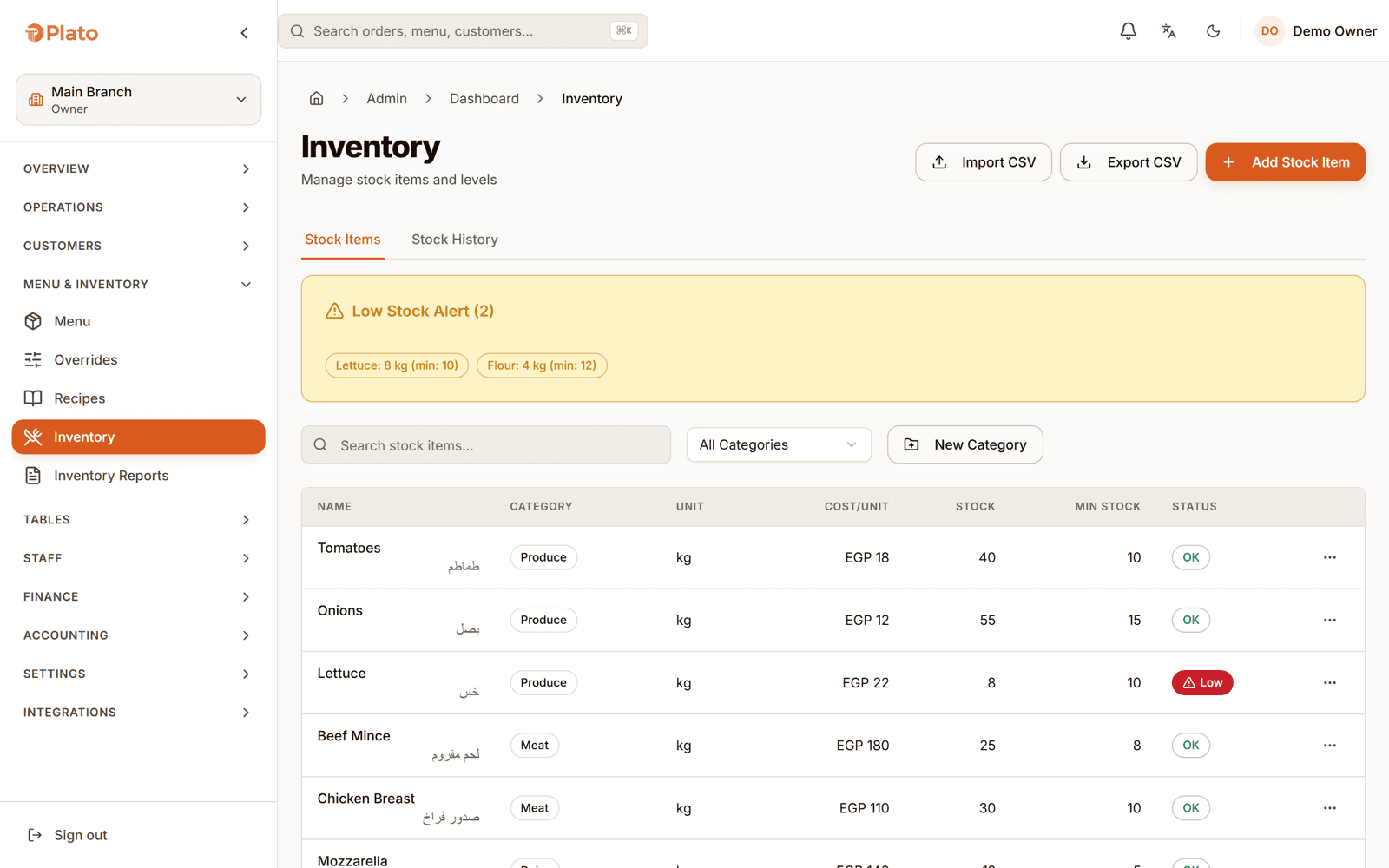
What Plato inventory does
Plato is the inventory and food-cost layer of a restaurant operating system built for Egypt. Recipes link every dish to its ingredients, stock moves the moment an item is fired to the kitchen, counts record the difference against what the system expected, and food cost is calculated from what the kitchen actually consumed.
From recipe to real cost
Stock control fails when it depends on someone remembering. In Plato the movement is a by-product of service that already happened.
The moment an order item is fired to the kitchen, its recipe deducts each ingredient from that branch's stock, in the ingredient's own unit. Nobody re-keys a sale into a stock sheet after closing.
Post a stock count and Plato records what you counted against what it expected, then adjusts. Shrinkage stops being a feeling and becomes a number with a date on it.
Log waste against a production batch, see near-expiry stock before it turns, and read the waste report by ingredient and period instead of by argument.
Recipe costing prices every dish from its ingredients' current cost, so food-cost percentage and contribution margin sit beside the item that earned them.
Recorded against the run, so the next batch starts from a real number.
Theoretical against actual
A production run records the theoretical consumption for the output you made and the actual quantities your team used. Plato keeps both and the variance between them, so the gap shows up per run instead of at the end of the year.
Against the spreadsheet
Most kitchens already track stock. The question is whether the number survives a busy week.
| Capability | Stock spreadsheet | Plato |
|---|---|---|
| Deduction | Typed in after the shift | Fires with the kitchen ticket |
| Units | Converted by hand | Purchase, recipe and count units converted for you |
| Counts | A number with nothing to compare | Counted against expected, with the difference kept |
| Waste | Remembered, if at all | Logged per batch, reported by ingredient |
| Food cost | A monthly estimate | Per dish, from current ingredient cost |
| Branches | One file per branch | Transfers issued and received between branches |
Fitted to how you produce
Attach recipes to the dishes you actually sell and get cost per dish without hiring a cost controller to maintain it.
Produce in batches, record actual against theoretical consumption, and label the output with its expiry before it ships.
Issue and receive transfers between branches, and compare stock value, usage and waste across all of them in one view.
Getting your stock in
You do not need a perfect store room to start. You need a starting quantity and recipes on the dishes that move.
Bring in ingredients with their purchase units and costs. A photo of a supplier invoice is enough to start the list.
Link dishes to their ingredients and quantities. Plato shows which menu items still have no recipe attached.
Post an opening count so the system has a starting quantity to measure everything else against.
Serve a week, count again, and look at the gap between what was expected and what was on the shelf.
Restaurant inventory questions
RelatedSee how the same order reaches the kitchen and the books:Restaurant POS system
Yes. When an order item is fired to the kitchen, its recipe deducts each ingredient from that branch's stock in the ingredient's own unit. There is no separate step at the end of the shift.
Recipe costing prices each dish from the current cost of its ingredients. Food-cost percentage and contribution margin are then reported per menu item, so you can see which dishes carry the margin.
Posting a count records the counted quantity against the expected one and adjusts stock to what you counted. The difference is kept, so shrinkage can be reviewed by ingredient and by period.
Yes. Waste is logged against production batches, stock approaching its expiry date is listed before it turns, and the waste report groups it by ingredient and period.
Yes. A transfer is created, issued by the sending branch and received by the destination branch, so both sides keep an accurate quantity instead of one branch guessing.
Inventory is part of the same operating system, and the deduction is triggered by orders moving through the kitchen. The POS and kitchen screens are what keep stock current as service happens.
See it on your own recipes
Book a walkthrough using your dishes, your suppliers and the ingredients that actually move in your kitchen.
Send us a few details. We'll set up a live walkthrough on your real menu, in your language, within one business day.