Each item lands at its own station
Firing an order groups its items by station and opens a ticket for each one. The grill screen never fills up with drinks, and no station waits on a ticket that was never theirs.

Kitchen display system for Egypt
Every fired item lands at the station that cooks it, each ticket ages in front of the team, and a bump can be recalled instead of being final. No paper, no shouting down the line.
What the Plato KDS does
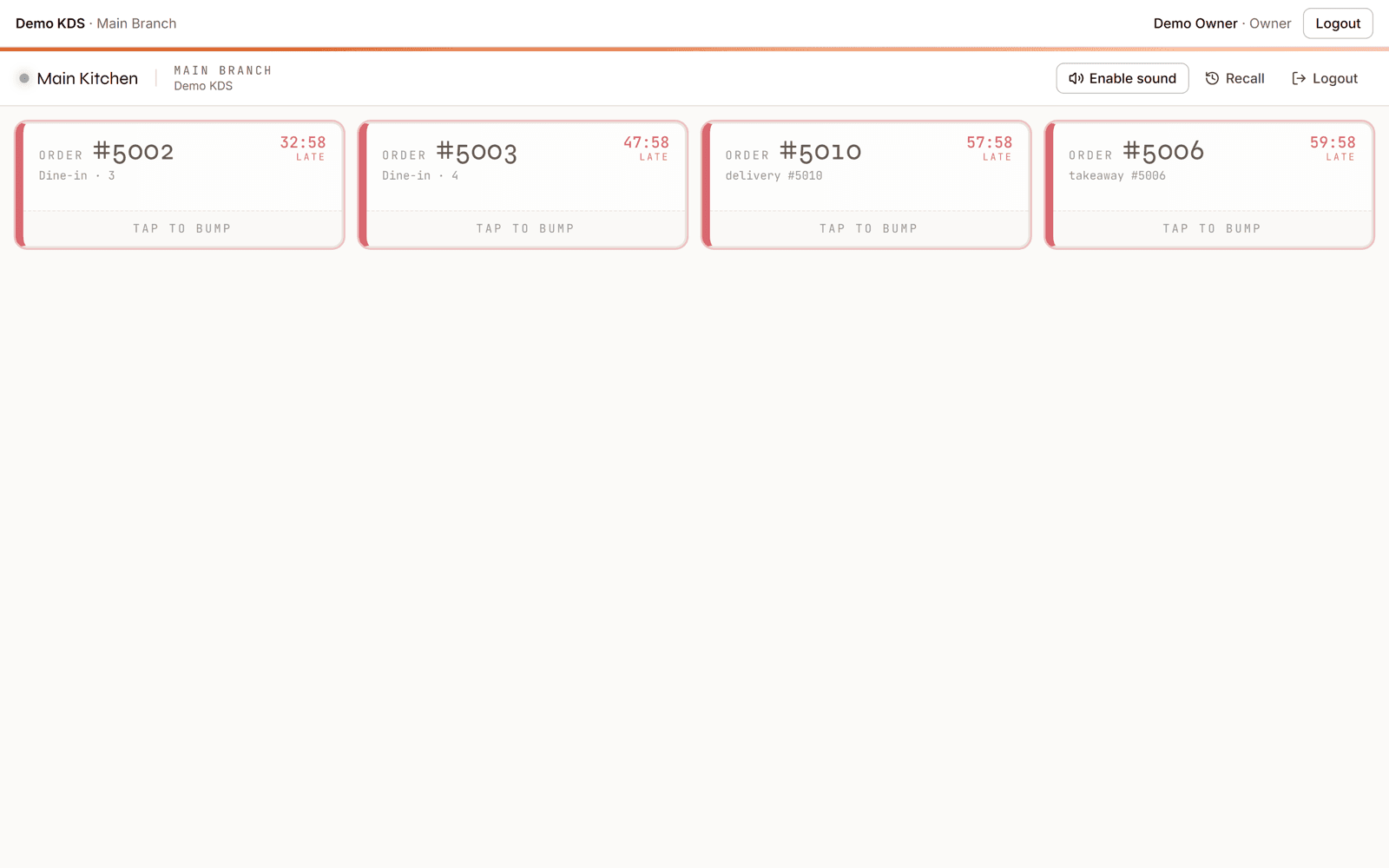
The Plato kitchen display system is the kitchen's view of the same order the cashier and waiter took. When items are fired, Plato groups them by station and opens one ticket per station, so grill sees grill and salad sees salad. Each ticket carries the time it was fired, and the team bumps it when it is ready.
From fire to pass
A kitchen screen earns its place by answering three questions without anyone asking: what is mine, how long has it been waiting, and what just went out.
Firing an order groups its items by station and opens a ticket for each one. The grill screen never fills up with drinks, and no station waits on a ticket that was never theirs.
Tickets carry the moment they were fired and colour up as they wait — amber at five minutes, red at ten. Lateness is visible from across the kitchen instead of discovered at the pass.
Bumped tickets can be recalled, the recall is counted, and the action is attributed to the device that made it. A wrong bump becomes a correction rather than a lost order.
What the kitchen marks ready becomes a list the floor can act on, so plates leave the pass because someone saw them, not because they shouted.
The same thresholds every shift, so nobody negotiates them.
Time on the ticket
Each ticket keeps the moment it was fired, the moment it was started and the moment it went ready. The screen colours the ticket as it ages, and the same timestamps stay on the record after the rush.
Against the printer
Paper works right up until the moment somebody needs to know how long a ticket has been sitting there.
| Capability | Printed dockets | Plato KDS |
|---|---|---|
| Routing | One printer, sorted by hand | One queue per station, split on fire |
| Timing | Whatever the clock on the wall says | Age on every ticket, amber at 5, red at 10 |
| Mistakes | A bumped docket is gone | Recall the bump, counted and attributed |
| The pass | Shouting | Ready items listed for the floor |
| After service | A spike full of paper | Timestamps kept on every ticket |
| Stations | Whatever the printer is near | Configured per branch, with a default |
Fitted to how your line runs
Run the whole kitchen on one screen with a default station, and split into more later without changing how orders are taken.
Give grill, salad, fryer and pastry their own queue and colour, so each screen shows only the work that belongs to it.
Stations are configured per branch, so the same menu can be cooked by a different line in each location without a separate setup.
Getting the screen up
The kitchen screen is fed by orders you are already taking, so most of the work is deciding who cooks what.
Create the stations your line actually has, give each a colour, and pick the default for anything unassigned.
Assign menu items to the station that cooks them, so firing an order splits the work correctly.
Open the kitchen display on a tablet or monitor at the station and it shows that station's live queue.
The team bumps a ticket when it is ready, and recalls it if it went too early — the correction stays on the record.
Kitchen display questions
Menu items are assigned to a station. When an order is fired, Plato groups its items by station and opens one ticket per station, so each screen only shows the work that belongs to it.
Each ticket keeps the moment it was fired and ages on screen — amber at five minutes and red at ten — and late tickets raise an alert, so the thresholds are the same on every shift.
A bumped ticket can be recalled back to the queue. The recall is counted on the ticket and attributed to the device that made it, so mistakes are visible rather than silent.
Yes. The kitchen display reads the branch's live tickets, so it needs to be connected. It runs on a tablet or any monitor with a browser, on the same network as the rest of the branch.
No. A single screen with a default station runs a whole small kitchen, and you can split into separate station queues later without changing how orders are taken.
Items the kitchen marks ready become a list the floor can act on, so runners and waiters can see what is waiting at the pass instead of relying on someone calling it out.
See it on your own line
Book a walkthrough with your menu, your stations and the tickets your kitchen actually runs on a Thursday night.
Send us a few details. We'll set up a live walkthrough on your real menu, in your language, within one business day.